WhatsApp Temporary Ban vs Permanent Ban: What's the Difference and How to Recover (2026)
 Abhyank Srinet
How Do You Know if Your WhatsApp Ban Is Temporary or Permanent — and Does It Matter?
You open WhatsApp to reply to a client and see a message you've never seen before. Something about your account being restricted. Your stomach drops. But here's the question that determines whether this is a 24-hour inconvenience or a business-ending disaster: is this a whatsapp temporary ban or a whatsapp permanent ban?
A coaching institute in Jaipur found out the hard way. They got a temporary restriction on Monday, ignored it, kept blasting broadcasts, and by Thursday the number was permanently banned. 1,200 parent conversations gone. Two years of broadcast lists wiped. They had to rebuild on a new number — and only 30% of parents saved it.
The difference between a whatsapp temporary ban and a whatsapp permanent ban isn't just duration. It's the difference between a warning you can recover from and a loss you can't undo.
The short answer: Temporary bans show a countdown timer inside WhatsApp (usually 24-72 hours) and auto-resolve when the timer expires. Permanent bans display "your phone number is banned from using WhatsApp" with no timer, no countdown, and no automatic recovery. Business API accounts face a separate system entirely — quality ratings that restrict messaging volume before any ban happens.
- Temporary bans are warnings — they always come with a visible countdown timer
- Permanent bans have no timer and require a manual appeal to support@whatsapp.com
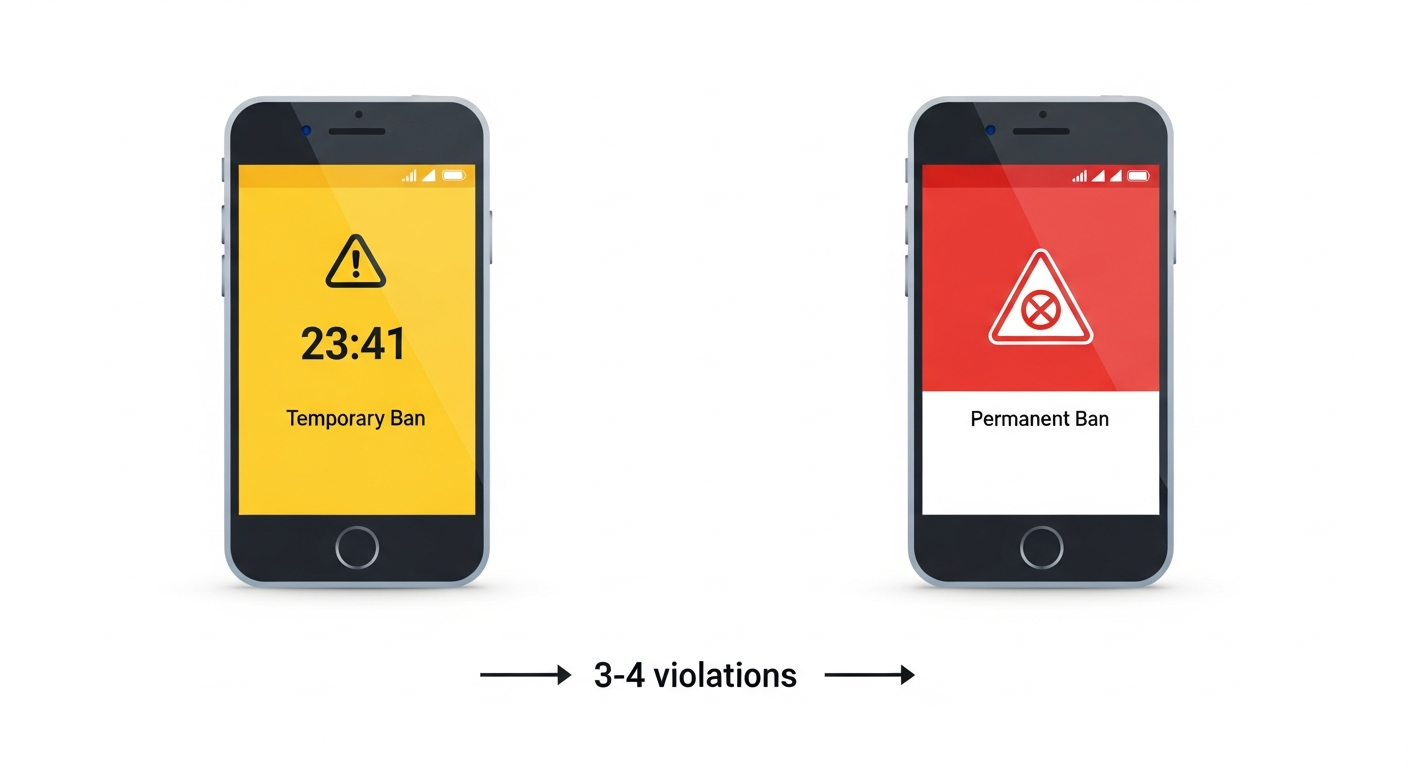
- Repeated temporary bans escalate to permanent — typically after 3-4 violations
- Business API accounts get quality rating drops (green → yellow → red) instead of instant bans
- Chat history survives temporary bans but is permanently deleted with permanent bans
What Exactly Is a WhatsApp Temporary Ban?
A whatsapp temporary ban is WhatsApp's first-level enforcement action — a time-limited restriction that blocks you from sending messages while preserving your account data. According to WhatsApp's official Help Centre, a temporary restriction is designed as a warning, not a punishment.
When WhatsApp temporarily bans your account, you'll see a countdown timer inside the app showing exactly when the restriction lifts. You cannot send messages, create broadcasts, or update your status during this period. However, you can still receive messages, and your chat history, contacts, groups, and broadcast lists remain intact.
Temporary bans typically last 24-72 hours. First offences usually get 24 hours; second offences within 30 days escalate to 48-72 hours. After the timer expires, your account returns to normal automatically — no action needed from your side.
What Triggers a Temporary Ban?
WhatsApp issues a whatsapp temporary ban for behaviour patterns that violate their Terms of Service but don't cross the threshold for permanent action. Many of these triggers relate to how you use broadcast lists and messaging volume:
| Trigger | Example | Typical Duration |
|---|---|---|
| Bulk messaging without opt-in | Sending 200+ promotional messages to contacts who never messaged you first | 24-48 hours |
| High block rate from recipients | More than 5% of broadcast recipients block your number | 24-48 hours |
| Sending identical messages rapidly | Copy-pasting the same offer to 50+ contacts in under 10 minutes | 24 hours |
| Modified app usage (first detection) | Using GB WhatsApp or WhatsApp Plus for the first time | 24 hours (escalates fast) |
| Multiple user reports | Several contacts report your messages as spam within a short window | 24-72 hours |
How Do You Know It's Temporary?
The countdown timer is the definitive sign. If you open WhatsApp and see a screen with a specific time remaining (e.g., "You can use WhatsApp again in 23:41:07"), it's temporary. No timer means it's permanent.
What Exactly Is a WhatsApp Permanent Ban?
A whatsapp permanent ban is WhatsApp's final enforcement action — your phone number is blocked from using WhatsApp entirely, with no automatic recovery path. Unlike a whatsapp temporary ban, a whatsapp permanent ban means WhatsApp has determined the violation is severe enough to warrant complete removal. WhatsApp's account ban policy states that accounts violating their Terms of Service may be permanently blocked.
When permanently banned, you'll see a message stating "Your phone number is banned from using WhatsApp" or "This phone number is not allowed to use WhatsApp." There is no countdown timer. Your account is immediately deactivated, and all data is queued for deletion.
Permanent bans delete everything: chat history, media files, group memberships, broadcast lists, and WhatsApp Business catalogue items. None of this data can be recovered, even if the ban is later reversed through an appeal.
What Triggers a Permanent Ban?
A whatsapp permanent ban is triggered by severe or repeated violations. Using unofficial automation tools is the most common cause we see among Indian businesses:
| Trigger | Why It's Permanent | Appeal Likelihood |
|---|---|---|
| Unofficial automation tools (Baileys, WA-Automate, Evolution API) | Reverse-engineering WhatsApp's protocol is a direct ToS violation | Very low (<5%) |
| Repeated temporary bans (3-4 within 60 days) | Escalation — WhatsApp treats this as ignoring warnings | Low (~15%) |
| Sending illegal or harmful content | Zero tolerance policy for illegal material | Near zero |
| Mass spam campaigns | Sending thousands of unsolicited messages | Very low (<5%) |
| Modified APK usage (repeat detection) | GB WhatsApp, WhatsApp Plus after prior warnings | Low (~10%) |
| Commercial use of personal WhatsApp at scale | Running business operations on a personal number with broadcast abuse | Moderate (~20%) |
WhatsApp Temporary Ban vs Permanent Ban: The Complete Comparison
Here's the side-by-side breakdown of every difference between a whatsapp temporary ban and a whatsapp permanent ban that matters for your business:

| Factor | Temporary Ban | Permanent Ban |
|---|---|---|
| Visual indicator | Countdown timer visible in app | "Phone number is banned" message, no timer |
| Duration | 30 minutes to 72 hours | Indefinite (requires appeal) |
| Auto-recovery | Yes — account restores when timer expires | No — must appeal through support@whatsapp.com |
| Chat history | Preserved — all conversations intact | Deleted — cannot be recovered |
| Contacts & groups | Preserved | Lost — group memberships removed |
| Broadcast lists | Preserved | Deleted permanently |
| Can receive messages | Yes | No |
| Appeal process | Not needed (wait for timer) | Email support@whatsapp.com with phone number + explanation |
| Appeal timeline | N/A | 3-7 business days |
| Success rate of recovery | 100% (automatic) | Below 20% for automation bans; higher for accidental violations |
| Escalation risk | Yes — 3-4 temp bans → permanent | Final stage — no further escalation |
What About WhatsApp Business API Bans — Are They Different?
Yes, completely. If you're using the official WhatsApp Business API through a BSP like Kraya, the ban system works entirely differently from personal WhatsApp or the free WhatsApp Business App. The API uses a quality rating system that gives you advance warning and gradual restrictions before any account-level action.
Business API accounts never get "surprise banned." The quality rating system (green → yellow → red) gives you days or weeks of warning before Meta takes account-level action. This is the single biggest advantage of using the official API over personal WhatsApp for business.
How the Quality Rating System Works
| Rating | Status | What Happens | Action Required |
|---|---|---|---|
| 🟢 Green | Healthy | Full messaging limits, all features available | None — maintain current practices |
| 🟡 Yellow | Warning | Messaging limits may be reduced, quality flagged | Review recent templates, pause low-performing campaigns |
| 🔴 Red | Critical | Messaging limits severely reduced, account at risk | Stop all template campaigns, fix content, contact BSP immediately |
| ⛔ Flagged | Restricted | Account disabled pending review by Meta | Work with BSP to submit corrective action plan |
Why This Matters for Indian Businesses
Most Indian businesses running WhatsApp for sales use personal WhatsApp or the free Business App — both of which give zero warning before a ban. A property dealer in Wakad sending 100 broadcasts daily from a personal number gets the same instant permanent ban as a spammer. No quality rating, no yellow warning, no chance to fix behaviour.
Businesses on the official API through a BSP like Kraya get the quality rating dashboard, template performance metrics, and automated alerts when ratings drop. You see problems before they become bans.
How to Recover from a Temporary Ban — Step by Step
Recovering from a whatsapp temporary ban is straightforward because the system is designed for recovery. Here's exactly what to do:
Step 1: Stop the triggering behaviour immediately. If you were sending bulk messages, stop. If you were using a modified app, delete it and install official WhatsApp from the Play Store or App Store. The timer won't reset, but continued violations during a temporary ban can trigger escalation to permanent.
Step 2: Wait for the countdown timer to expire. Don't try workarounds like reinstalling WhatsApp, clearing data, or changing your phone. These don't speed up recovery and can actually flag your account for additional scrutiny.
Step 3: Change your messaging pattern before resuming. When the timer expires and your account is restored, don't immediately go back to the same messaging volume. WhatsApp monitors recently-restricted accounts more closely for 30 days after a temporary ban.
The 30-day watch period after a temporary ban is critical. If you get a second temporary ban within 30 days of the first, the third violation almost always escalates to permanent. Reduce your messaging volume by at least 50% during this period.
How to Appeal a Permanent Ban — and When It Actually Works
Appealing a whatsapp permanent ban is harder, slower, and has a much lower success rate. But it's not impossible — if the ban was triggered by something other than deliberate automation or illegal content.
The Appeal Process
Step 1: Open WhatsApp and tap "Support" on the ban screen. If there's no support option visible, email support@whatsapp.com directly. Include your full phone number with country code (e.g., +91 98765 43210).
Step 2: Write a clear, honest explanation. State what happened, acknowledge the violation if applicable, and describe what you've changed. "I was using a bulk messaging tool. I've deleted it and will only use official WhatsApp features going forward" works better than "I didn't do anything wrong." See our complete guide on safe bulk messaging practices.
Step 3: Attach supporting evidence. If the ban was triggered by user reports and you believe it was unjustified, provide context: you're a business, the contacts had opted in, here's proof of consent.
Step 4: Wait 3-7 business days. WhatsApp's review team processes appeals manually. Sending multiple follow-up emails doesn't speed up the process and may delay it.
When Appeals Actually Succeed
| Ban Cause | Appeal Success Rate | Why |
|---|---|---|
| Accidental user reports (competitors, disgruntled contacts) | ~40-50% | Demonstrable that the ban was triggered by bad-faith reports, not your behaviour |
| Commercial use on personal number (first offence) | ~20-30% | WhatsApp may give a second chance if you commit to migrating to Business App or API |
| Modified app usage (GB WhatsApp) | ~10-15% | Only works if you can prove you've fully removed the modified app |
| Unofficial automation tools | <5% | WhatsApp has zero tolerance for protocol violations — these are rarely reversed |
| Illegal or harmful content | ~0% | Never reversed |
What Does a WhatsApp Ban Actually Cost Your Business?
The financial impact of a whatsapp permanent ban goes far beyond the inconvenience. For Indian businesses that rely on WhatsApp as their primary sales channel, the cost breakdown looks like this:
From our work with 600+ Indian businesses at Kraya, the average cost of a permanent WhatsApp ban for a sales-dependent business is ₹2-5 lakhs when you account for lost conversations, rebuilding time, and the contacts who never save your new number.
| Cost Category | Temporary Ban Impact | Permanent Ban Impact |
|---|---|---|
| Lost sales (during downtime) | 1-3 days of missed responses | 2-4 weeks while rebuilding on new number |
| Contact recovery | No loss — all contacts preserved | Only 30-40% of contacts save your new number |
| Broadcast list rebuilding | No loss | Complete rebuild — months of segmentation lost |
| Team productivity | Minor — team can handle other tasks | Major — 2-3 weeks of chaos while migrating |
| Customer trust | Minimal — most don't notice | Significant — "why did your number change?" erodes confidence |
| Estimated total cost (₹) | ₹5,000-15,000 | ₹2,00,000-5,00,000 |
How to Prevent Both Types of Bans — the Framework That Works
Prevention follows a clear framework that applies to both whatsapp temporary ban and whatsapp permanent ban scenarios. For a comprehensive guide, see our complete ban prevention guide. If you're currently on personal WhatsApp or the free Business App, these rules keep you below WhatsApp's detection thresholds. If you're on the Business API, the quality rating system handles most of this automatically.
For Personal WhatsApp and Business App Users
Rule 1: Never exceed 200 messages per day from a single number. This applies to individual messages plus broadcast recipients combined. Even if WhatsApp technically allows more, exceeding 200 consistently triggers velocity detection — the fastest path to a whatsapp temporary ban.
Rule 2: Warm up new numbers gradually. Start with 20-30 messages per day in week 1, increase to 50 in week 2, then 100 in week 3. Jumping straight to high volume on a new number is the fastest path to a whatsapp temporary ban.
Rule 3: Never send the same message to more than 30 contacts. Identical content across recipients is the strongest spam signal WhatsApp detects. Use personalised broadcast templates — at least the greeting or one detail per message should vary.
Rule 4: Maintain a block rate below 3%. If 3+ people out of every 100 block you, your account is at risk. Ask yourself: "Would I want to receive this message?" If the answer is no, don't send it.
For Business API Users
Rule 1: Monitor your quality rating daily. If it drops from green to yellow, pause all marketing templates immediately and review what changed. Don't wait for red.
Rule 2: Use separate template categories. Keep transactional messages (order updates, appointment reminders) separate from marketing messages. Poor marketing template performance shouldn't drag down your overall quality rating.
Rule 3: Implement a template testing workflow. Send new templates to a small test group (50-100 contacts) before broadcasting to your full list. If the test group's response rate is below 2% or block rate is above 1%, don't scale it.
The businesses we see maintain green quality ratings consistently follow one pattern: they send messages people want to receive. It sounds obvious, but 80% of WhatsApp bans — temporary and permanent — come from sending messages the recipient didn't ask for.
When Should You Switch to the Business API?
If you've received even one whatsapp temporary ban, it's time to seriously consider moving to the official Business API. Here's the decision framework:
Stay on personal/Business App if: You message fewer than 50 contacts per day, your contacts are all personal connections who know you, and you've never received a restriction or warning.
Move to Business API if: You send more than 100 messages daily, you've received any whatsapp temporary ban or restriction, you have a team sharing a single WhatsApp number, or your business depends on WhatsApp for sales pipeline management. See our Business API provider comparison for the full breakdown of options.
The API costs ₹1-3 per conversation (varies by BSP and message type), but that's negligible compared to the ₹2-5 lakh cost of a permanent ban. Kraya, as a registered BSP, provides the full API integration with quality monitoring, template management, and automated compliance checks built in.
If you're currently running business operations on personal WhatsApp and want to migrate safely, talk to our team about a migration plan that preserves your contacts and messaging workflow while eliminating ban risk entirely.
Related: Best Wati Alternatives for Indian SMBs in 2026
Related: Best AiSensy Alternatives for WhatsApp Marketing in India
Related: Best Interakt Alternatives for Indian Sales Teams in 2026
Frequently Asked Questions

Written by
Founder & CEO, Kraya AI
Abhyank Srinet is the Founder and CEO of Kraya AI, a WhatsApp CRM and sales automation platform serving 600+ Indian businesses. He is also the founder of MiM-Essay, one of India's largest Masters admissions consulting firms.
More from Abhyank


